


Updated 11/11/26: Added additional information from ConnectWise and Huntress.
ConnectWise is investigating an active malware campaign targeting managed service providers (MSPs) that uses compromised ScreenConnect environments to deploy malicious remote access clients on customer devices.
As part of its investigation, ConnectWise disabled five third-party ScreenConnect extensions in approximately 400 partner environments as a precaution, warning that they could be associated with the attacks.

The campaign was first discovered Wednesday by cybersecurity firm Huntress, which says it has identified six compromised MSPs and 286 affected endpoints across 47 organizations, and that the number of victims continues to rise.
“Our SOC is running an active campaign that began around 5:47 p.m. UTC today, targeting cloud-hosted ScreenConnect instances,” Huntress posted on Reddit.
“We are currently tracking 6 compromised MSPs and over 286 endpoints, and these numbers continue to climb. ConnectWise is engaged and working with us on this matter.”
ScreenConnect is a remote access and support platform used by MSPs and IT teams to remotely manage and troubleshoot customer devices.
According to Huntress, attackers use ScreenConnect’s Run Command functionality to deploy malicious ScreenConnect clients to managed endpoints, providing remote access outside of the MSP’s legitimate ScreenConnect environment.
The researchers also warned of a potentially more dangerous technique in which attackers can compromise an MSP technician’s workstation when they initiate a ScreenConnect session with an infected client device.
Spike Brandt, senior threat intelligence incident commander at Huntress, told BleepingComputer that the activity appears to involve the abuse of legitimate functionality rather than the exploitation of a software vulnerability.
“This appears to be an abuse of legitimate functionality, facilitated by the use of custom tools that are, in some cases, compiled on the fly on the victim’s computer,” Brandt told BleepingComputer.
“We have no information on how a computer or patient zero machine would have launched this attack.”
Huntress said it began receiving alerts when malicious ScreenConnect clients appeared on monitored endpoints and then retrieved attacker scripts that were still accessible to analyze how the attacks worked.
However, the precise mechanism by which malware spreads from an infected endpoint to a technician’s workstation has not been publicly explained.
ConnectWise disables third-party extensions
In a security advisory released Wednesday evening, ConnectWise confirmed unauthorized access to ScreenConnect partner accounts and installation of unauthorized remote access software in customer environments.
As part of its investigation, the company discovered five independent third-party extensions that may be associated with the attacks and disabled them in approximately 400 partner environments as a precaution.
ScreenConnect extensions are installed through its built-in extensions marketplace through the ScreenConnect admin interface.
The extensions are:
Labtech Plus
RMM Plus
RMM+
RMM Plus Password Link
RMM+ password link
“Our initial assessment leads us to suspect that the threat actor deployed additional remote access software through independent third-party extensions that partners may have added to their environments,” ConnectWise said.
The company stressed that installing these extensions does not necessarily mean that a network has been compromised and that the attacks are still under investigation.
“Disabling these third-party extensions is a preventative containment measure. It does not establish that unauthorized software, persistence mechanisms or access already present on the affected devices have been removed,” ConnectWise explained.
Although ConnectWise has disabled the extensions in affected cloud-hosted environments, it cautioned that on-premises ScreenConnect customers must disable them manually, as the company cannot do this on their end.
Partners have also been asked not to re-enable or re-install extensions until further instructions are available.
ConnectWise warned that disabling extensions does not remove malware, persistence mechanisms, or unauthorized access that attackers may have already established on compromised endpoints.
The company advised its partners to review authentication logs, extension installation records, administrative activity, run command history, and toolkit records for suspicious activity.
He also urged technicians to avoid launching interactive ScreenConnect sessions with potentially compromised devices and instead use separate security tools to investigate.
ConnectWise also said it has received reports of technician workstations being compromised during ScreenConnect interactive sessions, but these reports are still being confirmed.
The company added that it has no reason to believe that partners who have not deployed the five identified extensions are impacted by this incident, but encouraged all partners to remain on heightened alert.
Huntress has not determined how attackers access affected MSP environments, but says its current telemetry indicates compromised credentials or hijacked operator sessions.
Huntress also warned that the sequential identifiers used by the attackers suggest other MSPs may have been previously compromised.
“The sequential tags assigned by the attackers suggest that other MSPs may have been compromised earlier, so ScreenConnect users should check their command execution history even if they did not receive alerts,” Huntress told BleepingComputer.
Huntress also shared Indicators of Compromise (IOCs) to help organizations identify malicious activity, including malicious ScreenConnect client credentials and infrastructure used by attackers.
Indicators include:
Attackers relay:
185.99.255(.)28(hostname:screen)C2 domains:
newnewnew.gotdns(.)org,soxnewwork.homedns(.)orgAdditional C2 possible:
cdn007-digitaldownloads(.)comSecondary C2:
sc.payproofkit(.)com(155.94.150(.)39hostname: WIN-FB5CKHMU4E1)Intern:
hxxps://ns.mo7sen(.)dev/EadF.php?p=4Rogue ScreenConnect Customer ID:
2588ef5c15954b10,ed630cc2c873b091Installation model:
/Bin/ScreenConnect.ClientSetup.msi?...&c=ExploitedAttacker name:
AddminFiles:
Panel-Lateral.ps1,runnew.cmd,ToolboxRelayUploader.exe,Run-Lateral-Full.bat
Researchers urge MSPs to examine their environments for signs of compromise and avoid launching interactive ScreenConnect sessions with potentially infected endpoints.
Huntress also told BleepingComputer that its researchers contacted ConnectWise, the VPS provider hosting the attacker’s infrastructure, the cloud providers whose dynamic DNS services were used in the attacks, as well as the broader MSP community.
Previous malware activity linked to a malicious ScreenConnect ID
BleepingComputer found an earlier malicious batch script that references one of the malicious ScreenConnect client IDs listed by Huntress, suggesting the ID was used in malicious activity months before the current attacks were disclosed.
The script, named SSA-2026-STATEMENT-15518787.bat (VirusTotal), appears to impersonate a Social Security Administration statement and was first uploaded to VirusTotal on July 25, 2026.
The batch file attempts to add Microsoft Defender exclusions and creates persistence via the Windows Startup folder and the Run registry key.
He then contacts amexsafekeyupdate.com to retrieve installation commands from two separate installers.
The VirusTotal sandbox activity associated with the sample includes ScreenConnect MSI installer downloads from cdn007-digitaldownloads(.)com And cyberrexdesign.screenconnect(.)comwith cdn007-digitaldownloads(.)com also listed by Huntress as a possible C2 domain.
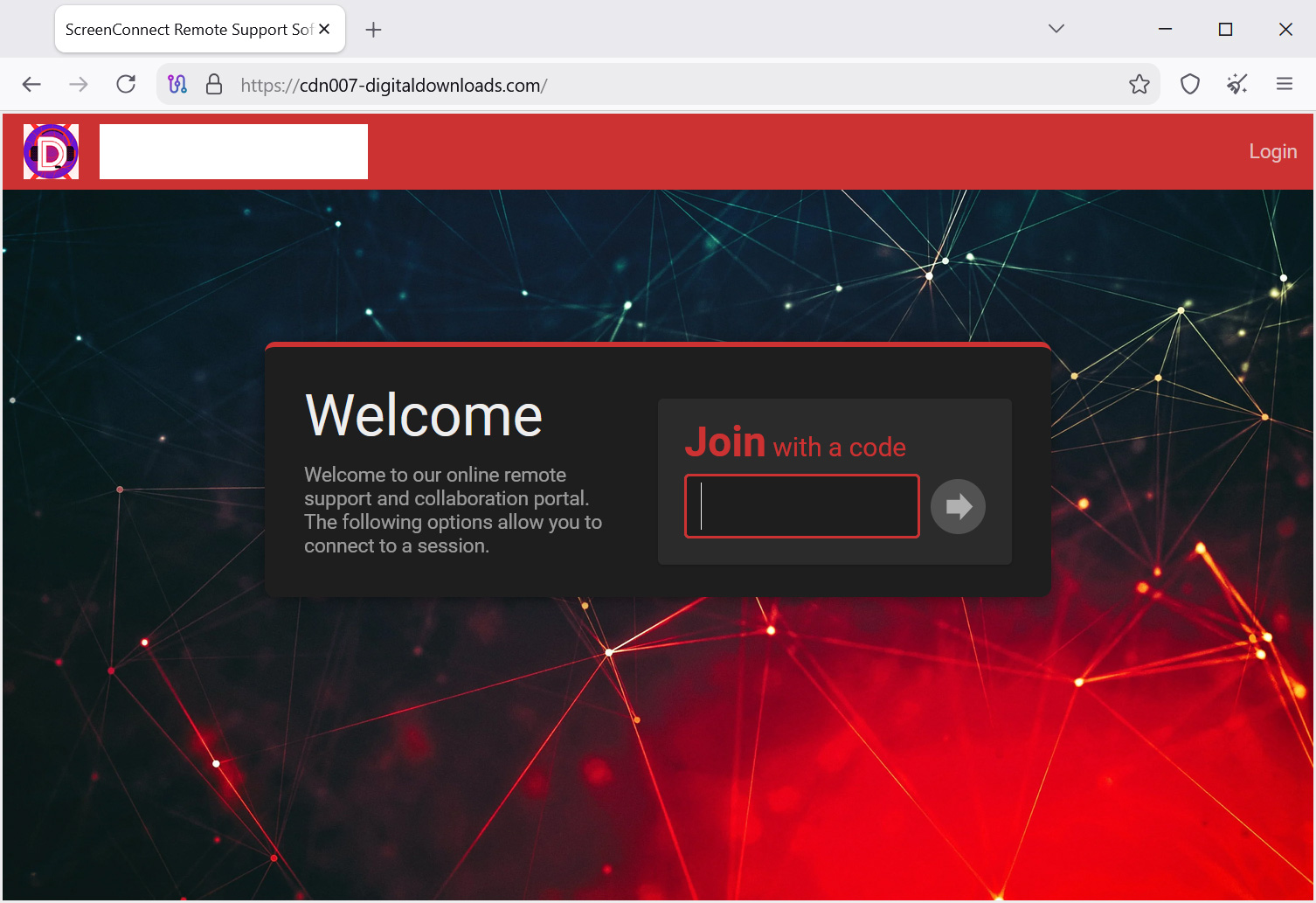
Source: BleepingComputer
After launching the second installer, the script uses PowerShell to search for running processes and Windows services. ed630cc2c873b091one of the malicious ScreenConnect client IDs identified by Huntress.
If the identifier is found, the script considers the installation successful and sends a notification to attackers via Telegram.
The previous script also appears designed for a different distribution campaign, with its Social Security-themed file name suggesting it may have been used in phishing attacks.
When asked about previous activity, Huntress declined to comment on the specific July incident, but said it had observed a significant increase in attacks using legitimate remote monitoring and management (RMM) software as an initial payload in 2026.
The relationship between July’s malware activity and the current ScreenConnect attacks remains unclear.

Adaptive Security’s AI agents analyze email intent, context, and behavior to uncover phishing, business email compromise, and invoice fraud.
See what’s happening with a 14-day read-only scan of Microsoft 365 or Google Workspace, without MX modifications.
Start your free email security scan.
Gn tech