Skip to content
-
Subscribe to our newsletter & never miss our best posts. Subscribe Now!
Today's News. Tomorrow's Perspective. Today's News. Tomorrow's Perspective.

Deliver fast, factual, and easy-to-understand news covering global events, technology, business, science, AI, health, entertainment, and lifestyle.

Today's News. Tomorrow's Perspective. Today's News. Tomorrow's Perspective.

Deliver fast, factual, and easy-to-understand news covering global events, technology, business, science, AI, health, entertainment, and lifestyle.

  • Home
  • Breaking News
  • Business
  • Sports
  • Health
  • Politics
  • Technology & AI
  • World
  • Home
  • Breaking News
  • Business
  • Sports
  • Health
  • Politics
  • Technology & AI
  • World
Close

Search

  • https://www.facebook.com/
  • https://twitter.com/
  • https://t.me/
  • https://www.instagram.com/
  • https://youtube.com/
Subscribe
ChatGPT can now consult your Chrome tabs to complete tasks for you
Technology & AI

ChatGPT can now consult your Chrome tabs to complete tasks for you

By adminvoxa
October 16, 2026 2 Min Read
Comments Off on ChatGPT can now consult your Chrome tabs to complete tasks for you

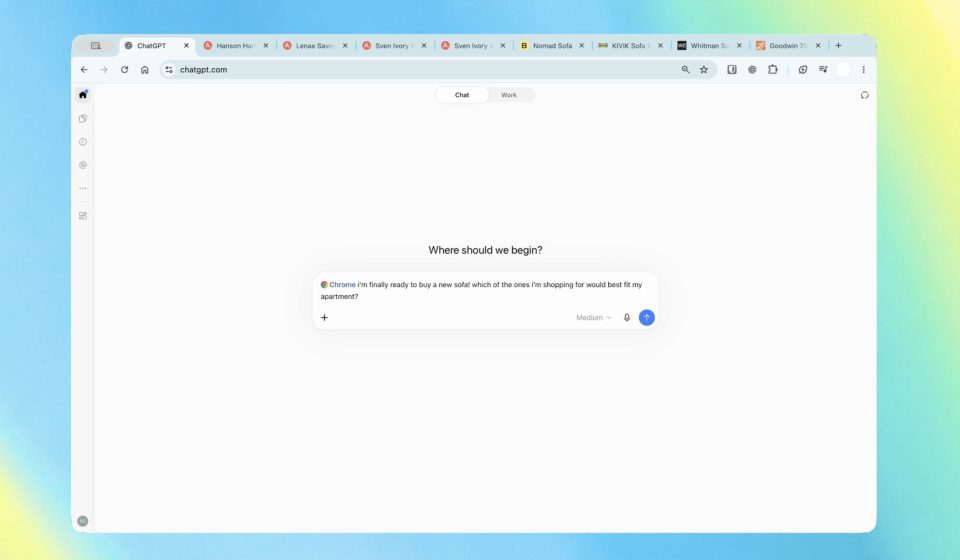
OpenAI has updated its ChatGPT extension for Chrome, giving it the power to look at your tabs so it can offer more personalized and helpful responses to your queries. The company previously had its own browser, but it retired the product on August 9. It did, however, roll out upgrades to the Chrome extension that made ChatGPT a more viable alternative to Gemini in the browser. With these latest updates, ChatGPT can now perform even more tasks in Chrome.

If you’re in ChatGPT Chat, you can ask the AI ​​assistant to take a look at your open tabs in Chrome to conjure up responses that would be personally helpful. For example, you can ask them to compare the sofas opened on three different tabs according to their dimensions, price, delivery time and return policy.

Meanwhile, if you use ChatGPT Work, OpenAI’s agent designed for complex, multi-step tasks, you can ask the assistant to send messages, fill out forms, organize tabs, and fill out forms for you. You can have ChatGPT fill out a form for your new dentist and then add your schedule to the calendar, for example. Another example is to ask the chatbot to analyze the conditions of several contractors open in several tabs, then compose an email to the supplier who most matches your needs.

Plus, ChatGPT in Chrome’s sidebar now has access to your entire history, so you can talk to it and give it tasks without having to step away from what you were doing. You can get the ChatGPT extension regardless of your plan. OpenAI says that besides Chrome, the extension is also compatible with other Chromium-based browsers, including Microsoft Edge, Brave, and Opera.

Next: Using ChatGPT directly in a Chrome tab has received a major upgrade: all the power of ChatGPT is now in your browser.

Your entire ChatGPT history is there, and you can ask questions in Chat or get things done in Work – side by side while you’re on a site. pic.twitter.com/ABiwzLvNnD

– ChatGPT (@ChatGPT) October 15, 2026


Gn tech

Post Views: 8
Author

adminvoxa

Follow Me
Other Articles
Elon Musk settles fraud lawsuit over his $1 million gifts to 2024 election voters
Previous

Elon Musk settles fraud lawsuit over his $1 million gifts to 2024 election voters

Why AI translation apps can fail doctors and patients.
Next

Why AI translation apps can fail doctors and patients.

Deliver fast, factual, and easy-to-understand news covering global events, technology, business, science, AI, health, entertainment, and lifestyle.
  • About Us
  • Accessibility Statement
  • Advertise With Us
  • AI Usage & Transparency Policy
  • Contact us
  • Cookie Policy
  • Corrections Policy
  • Meet Our Team
  • Privacy Policy
    • Disclaimer
    • DMCA & Copyright Policy
    • Editorial Policy
    • Ethics Policy
    • Fact-Checking Policy
  • Terms and Conditions
Copyright 2026 — Today's News. Tomorrow's Perspective.. All rights reserved.