
Skip to content
-
Subscribe to our newsletter & never miss our best posts. Subscribe Now!
Today's News. Tomorrow's Perspective. Today's News. Tomorrow's Perspective.

Deliver fast, factual, and easy-to-understand news covering global events, technology, business, science, AI, health, entertainment, and lifestyle.

Today's News. Tomorrow's Perspective. Today's News. Tomorrow's Perspective.

Deliver fast, factual, and easy-to-understand news covering global events, technology, business, science, AI, health, entertainment, and lifestyle.

  • Home
  • Breaking News
  • Business
  • Sports
  • Health
  • Politics
  • Technology & AI
  • World
  • Home
  • Breaking News
  • Business
  • Sports
  • Health
  • Politics
  • Technology & AI
  • World
Close

Search

Subscribe
Google Wallet rolls out Google Home digital keys to Android
Technology & AI

Google Wallet rolls out Google Home digital keys to Android

ment
By ment
November 12, 2026 2 Min Read
Comments Off on Google Wallet rolls out Google Home digital keys to Android

Google Wallet rolls out Google Home digital keys to Android

Google Wallet for Android is rolling out support for digital home keys if you have a compatible smart lock in Google Home.

After adding a home key to Google Wallet, you can tap to unlock with your phone. This uses NFC and “works even when your phone screen is locked” by default. However, you can adjust the verification settings in the Google Wallet app to require screen lock or biometric authentication. This requires Android 9+.

Approach unlock is also supported with an Aliro Ultra Wideband (UWB) compatible Android phone (see below) and an Aliro UWB compatible lock. Wear OS watches are not supported at launch.

  • Google Pixel 10 Pro series and later
  • Some UWB-enabled Samsung Galaxy phones
Google Wallet rolls out Google Home digital keys to Android

Behind the scenes, the digital key is linked to the Google Home app rather than a single lock. So, “each of your compatible Aliro locks will work with a single key in your Google Wallet”. Keys are added to Google Wallet using the Home app, which will prompt you to save them after setup. You can also go to Home Settings > Google Wallet Key.

Advertising – scroll for more content

Then your key “automatically syncs across compatible Android phones connected to your Google Wallet account.”

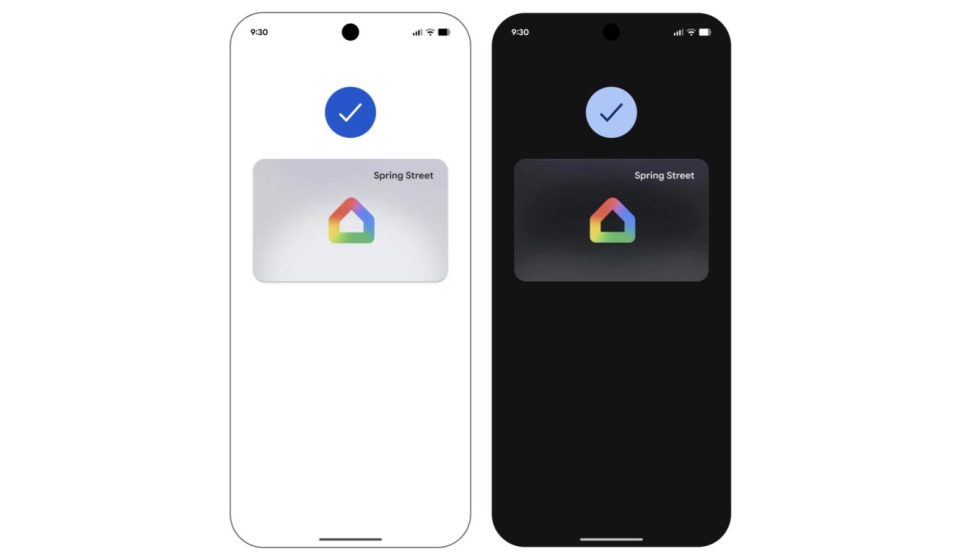
The map in Google Wallet has a simple Google Home logo with your home name in the upper right corner.

The following locks are supported at launch: Aqara u400 (UWB and NFC), Schlage Sense Pro (NFC at launch and UWB to follow), and Nuki Keypad 2 NFC. Support for other models is coming.

Additionally, support is rolling out first in the Google Home public preview before being offered to all users “over the coming weeks.”

Add 9to5Google as a preferred source on Google

FTC: We use automatic, revenue-generating affiliate links. More.

Gn tech

Views: 3
ment
Author

ment

**Ment** is a journalist at dailyvoxa.com, covering current events and sharing clear, reliable stories with readers. He is committed to thoughtful reporting and making important news accessible to a broad audience.

Follow Me
Other Articles
Heating costs will increase this winter due to the war in Iran: “devastating”
Previous

Heating costs will increase this winter due to the war in Iran: “devastating”

Frank Grillo supports James Gunn and Peter Safran after DC exit
Next

Frank Grillo supports James Gunn and Peter Safran after DC exit

Deliver fast, factual, and easy-to-understand news covering global events, technology, business, science, AI, health, entertainment, and lifestyle.
  • About Us
  • Accessibility Statement
  • Advertise With Us
  • AI Usage & Transparency Policy
  • Contact us
  • Cookie Policy
  • Corrections Policy
  • Meet Our Team
  • Privacy Policy
    • Disclaimer
    • DMCA & Copyright Policy
    • Editorial Policy
    • Ethics Policy
    • Fact-Checking Policy
  • Terms and Conditions
Copyright 2026 — Today's News. Tomorrow's Perspective.. All rights reserved.