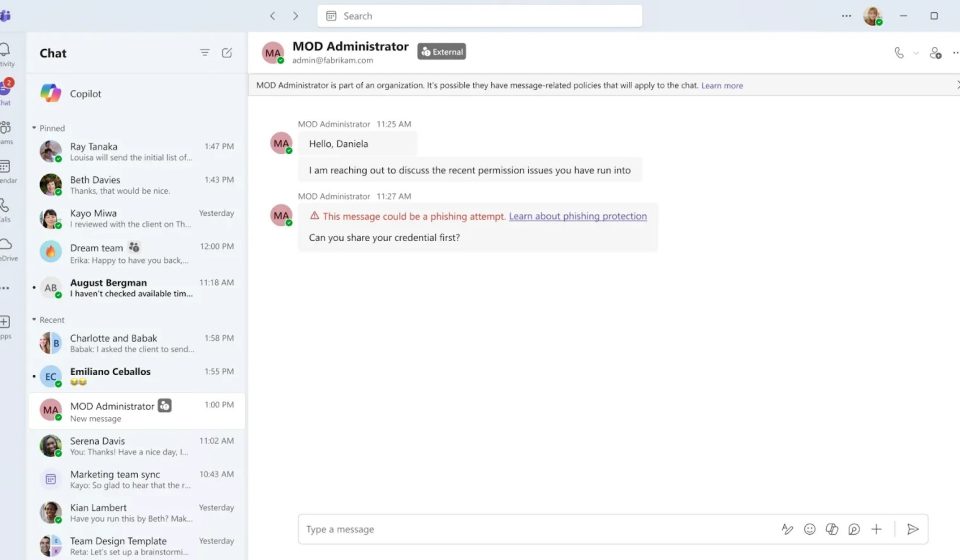

Microsoft is preparing to add AI phishing detection to Microsoft Teams, using conversation context to detect scams that may not contain any harmful links or attachments. The feature will primarily focus on initial conversations with external contacts, where attackers can pose as trusted support staff and ask employees to share sensitive information.
Microsoft detailed the change in Message Center advisory MC1519866, published on October 21, 2026. The targeted release is expected to begin in early November and end in mid-November. Worldwide general availability is expected to begin in early December and end in mid-December, rather than reaching all customers in November.
How conversation context helps detect phishing
Traditional warning signs, such as suspicious links and infected files, are not always present in social engineering attacks. Instead, a message can build trust, flag an urgent account issue, and persuade someone to disclose a password or approve remote access.
Microsoft says the new feature will analyze the context of the conversation to identify phishing, spoofing, social engineering and deceptive intentions. Its support tips outline coverage of one-on-one and group chats involving new external contacts across mobile, desktop, and web. Roadmap entry 575288 lists Android, iOS, Mac, desktop, and web support for the global standard cloud.
The sample warning accompanying the ad shows an external account called “MOD Administrator” discussing permission issues before asking: “Can you share your credentials first?” Teams displays a notice that the message could be a phishing attempt. The example illustrates why the meaning of a conversation can matter even without a dangerous URL.

This follows a familiar attack pattern. Cybersecurity News has previously reported on attackers impersonating IT help desk staff through Teams, using convincing support requests to push users into malware or remote access. Separate reports described fake help desk operators abusing Quick Assist after contacting employees through external Teams accounts.
Microsoft says the detection may initially run silently while it checks for quality. Visible warnings may appear after this validation, so users should not expect every suspicious message to trigger an immediate banner upon deployment.
For most users, protection focuses on external chats at first contact. Mobile Teams users in China may also benefit from protection for conversations within their own organization, mirroring the fraud patterns seen in that region. This is a specific extension, not a promise of universal internal chat analytics.
Microsoft states that this feature is for security purposes only. It is not intended for advertising, employee tracking, productivity analysis, or conversation summaries. The content of the client message is not retained by the detection system for model training or other secondary uses. This statement should not be construed as a change to any existing Teams retention policies.
What organizations should do
No new administrator configuration is required to enable protection. However, Microsoft recommends reviewing the guidance for unknown external contacts and encouraging users to report any suspicious activity or incorrect detections.
When a warning appears, employees should verify the identity and email address of the sender through a trusted channel. Microsoft advises blocking and reporting confirmed phishing, while false warnings can be flagged as no concern. Users should never share passwords, verification codes, financial details, or sensitive information during an unexpected support conversation.
The update adds another layer of warning, but staff should still independently verify unexpected support requests and report suspicious contacts, rather than taking the absence of a banner as proof of security.
Update defenses against new malware as it emerges. Integrate TI Feeds with data from 16,000 SOCs.
Gn tech