Skip to content
-
Subscribe to our newsletter & never miss our best posts. Subscribe Now!
Today's News. Tomorrow's Perspective. Today's News. Tomorrow's Perspective.

Deliver fast, factual, and easy-to-understand news covering global events, technology, business, science, AI, health, entertainment, and lifestyle.

Today's News. Tomorrow's Perspective. Today's News. Tomorrow's Perspective.

Deliver fast, factual, and easy-to-understand news covering global events, technology, business, science, AI, health, entertainment, and lifestyle.

  • Home
  • Breaking News
  • Business
  • Sports
  • Health
  • Politics
  • Technology & AI
  • World
  • Home
  • Breaking News
  • Business
  • Sports
  • Health
  • Politics
  • Technology & AI
  • World
Close

Search

  • https://www.facebook.com/
  • https://twitter.com/
  • https://t.me/
  • https://www.instagram.com/
  • https://youtube.com/
Subscribe
New Google Messages feature: circle to search for a message to see if it's a scam
Technology & AI

New Google Messages feature: circle to search for a message to see if it’s a scam

By adminvoxa
October 16, 2026 2 Min Read
Comments Off on New Google Messages feature: circle to search for a message to see if it’s a scam

Google has just offered you a new tool that is quite powerful for checking fraudulent messages in Google Messages. You know Circle to search? You can use it now to try to identify potential scams.

I don’t know why Google didn’t announce this yesterday as part of its Android security update for Google Messages, but it’s super nice. Circle to Search is one of the best new Android features in years and that only adds to its usefulness, especially with the increase in spam and scam SMS messages.

How to circle search in Google Messages to detect scams?

To try, you’ll open your Google Messages app, search for a message you’re interested in, press and hold your home button or navigation bar, and then once the Circle to Search animation is enabled, you’ll circle the message.
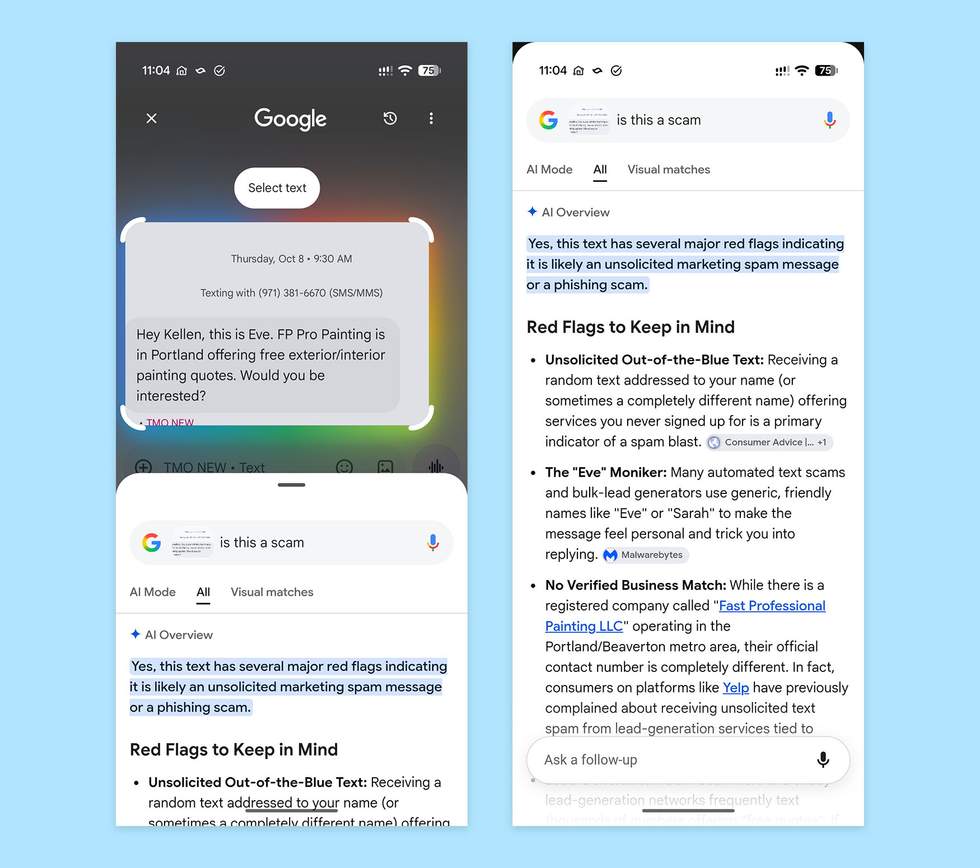
Google Messages – How to Circle Search to Check for Scam MessagesGoogle Messages – How to Circle Search to Check for Scam Messages

From there, Google will launch an AI preview with tips and insights into the message. They might even suggest next steps if they think it’s a scam, such as whether or not you should consider deleting the message and blocking the number.

In the example above, you will see an unsolicited spam message that I received from someone claiming to be a painting company and wanted to come to my house for a quote. Circle to Search agrees that this is a scam and then lists several red flags.

Of course, if the message is good, we hope he realizes it and brings you some peace. Below I tried it on another message and it said: “No, this text is most likely a legitimate official alert rather than a scam. ” Good.
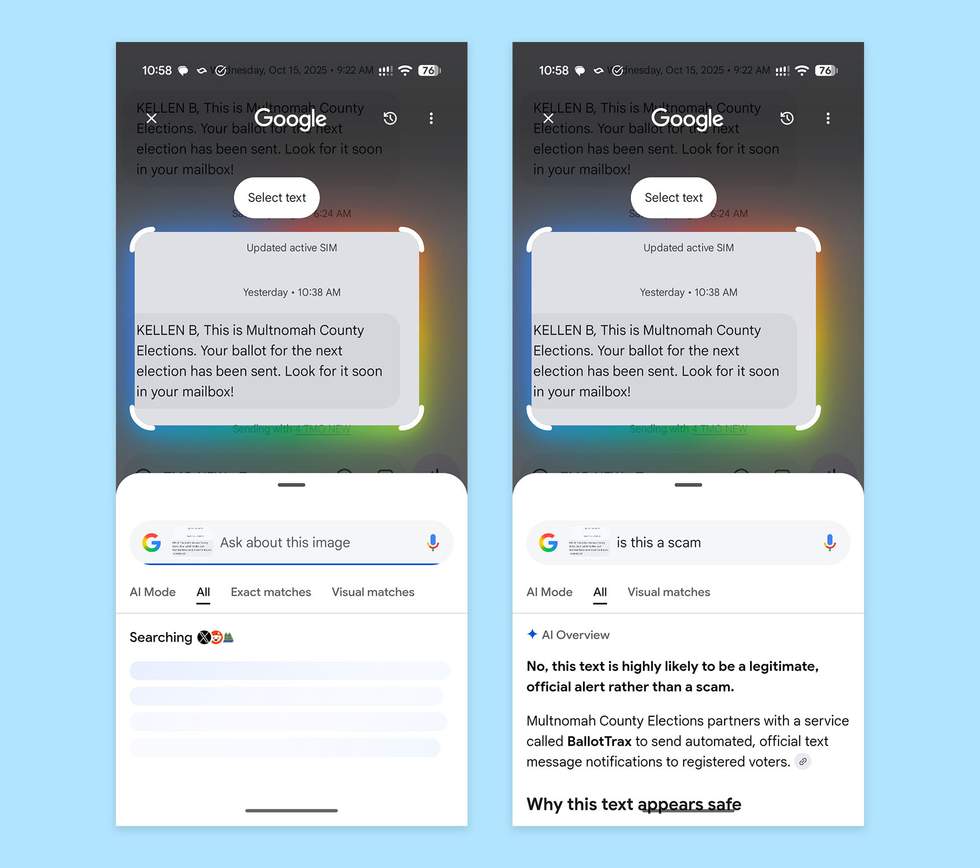
How to Circle to Search Google Messages to Check for ScamsHow to Circle to Search Google Messages to Check for Scams

This should be available now on your Android phone, provided it supports Circle to Search.

// Google

Add Droid Life to Google:

Gn tech

Post Views: 4
Author

adminvoxa

Follow Me
Other Articles
Free Dunkin' Bat Koozie: How to Get the Halloween Gift on October 16
Previous

Free Dunkin’ Bat Koozie: How to Get the Halloween Gift on October 16

Trump: Resumption of Ukrainian strikes on Russian oil sites is a “disgrace”
Next

Trump: Resumption of Ukrainian strikes on Russian oil sites is a “disgrace”

Deliver fast, factual, and easy-to-understand news covering global events, technology, business, science, AI, health, entertainment, and lifestyle.
  • About Us
  • Accessibility Statement
  • Advertise With Us
  • AI Usage & Transparency Policy
  • Contact us
  • Cookie Policy
  • Corrections Policy
  • Meet Our Team
  • Privacy Policy
    • Disclaimer
    • DMCA & Copyright Policy
    • Editorial Policy
    • Ethics Policy
    • Fact-Checking Policy
  • Terms and Conditions
Copyright 2026 — Today's News. Tomorrow's Perspective.. All rights reserved.