
The Tesla application finally has a version adapted to larger screens. Tesla is rolling out a redesigned app for iPad, iPhone Duo and Android tablets and foldables, according to Tesla UI engineer Alex Guichet, who wrote that the app is finally available “on the big screens you carry with you.”
Until now, you could run the iPhone app on an iPad, but it was just an expanded version of the phone app. The new app has a dedicated layout that uses the extra space to display more information at once.
A layout designed for larger screens
The new app places the main menu on the left and a large vehicle visualization on the right. The menu displays the same sections as the phone app, including Controls, Climate, Location, Autonomous Driving, Summon, Recharge, Set Schedules, Safety and Drivers and Safety Score, as well as quick status details such as your cabin temperature and how much of your driving was on FSD.
The extra space means you don’t lose your place when you open a section. Tap Loading, for example, and its submenu stays on the left while details fill the rest of the screen.
Guichet said Tesla designers “redesigned many screens in the app to fill a larger size,” adding that the team is still brainstorming and will make improvements in future updates as they are implemented.

A visualization that looks like your car screen
The vehicle visualization isn’t just a larger version of the 3D model at the top of the phone app. It’s more detailed and looks a lot like the visualization parked inside your car, with an ambient background color that matches your vehicle’s paint and reflections on the ground below.

You can always open your trunk or trunk, lock or unlock your car and check the charging status directly from the visualization.
New control customization and PSI button display
Below the visualization you will find quick commands such as Flash, Honk, Start and Vent. Tesla added a Customize controls button here, making the option more visible and therefore making it easier to modify the actions that appear in this area.
There is also a new Show PSI which displays your tire pressure directly on the visualization, so you don’t need to dig into the Orders menu to check them.
Energy and charging get the big screen treatment


Swipe to browse photos
Click on the arrows to browse
1 / 3
Tesla Energy customers also benefit from the new presentation. The Home Status screen shows a 3D home with live readings of solar, Powerwall, home usage, network and even your car charging in the garage. Sections such as Energy, Impact, Virtual Power Plant, and Go Off-Grid are listed alongside.
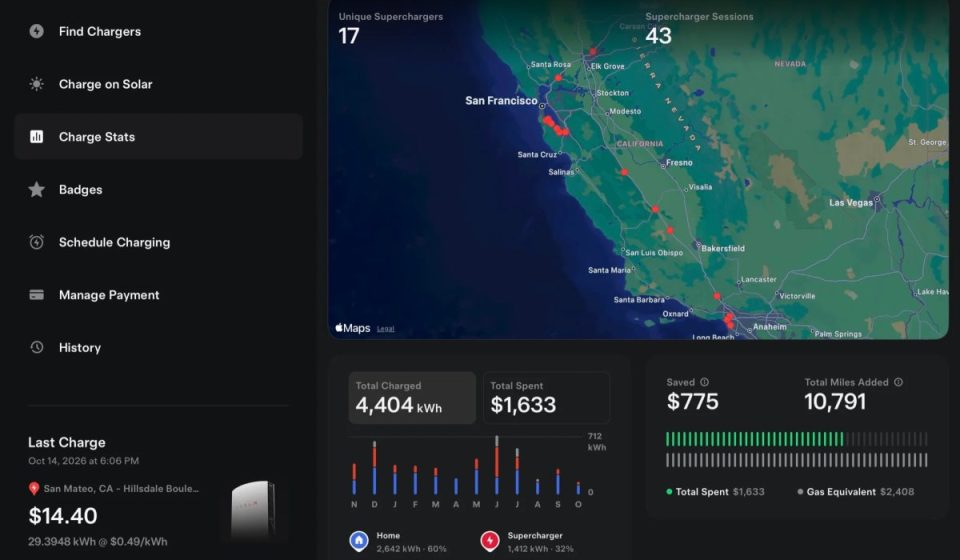
The Charge Stats screen also makes good use of space. It shows a full-width map of the Superchargers you’ve visited, along with total energy charged, total spent, money saved on gas, and a monthly breakdown of where you charged. Tables and graphs are much easier to read thanks to the extra screen space.
iPhone Duo support

The new app also supports Apple’s foldable iPhone Duo, which begins shipping and available in Apple Stores this week. Screenshots shared by Max Weinbach show the widescreen layout of the iPhone Duo’s interior display, with charging details, live camera and recent dash cam clips on the left and visualization of the new vehicle on the right. Fold it and the outer screen reverts to the phone’s familiar layout.

Slow deployment
The update is rolling out now and should hit the App Store and Google Play soon, but don’t expect it right away. Guichet said the rollout would be slow, adding that “it might take another week or two for everyone to get it” while Tesla makes sure it displays correctly on every screen.
As he said, “our application is bigger than you imagine.” Guichet also credited the Tesla designers and engineers who worked on it, saying “it took a village to get this done.”
This is the latest of several recent updates to the Tesla app, following support for passkeys for faster and more secure biometric logins last month. While Tesla is already promising more polish in future releases, expect the big-screen presentation to continue to improve over the next few updates.
Never miss a story
Find out what happens to your Tesla before it arrives. The latest news, upcoming features and software updates, straight to your inbox.
Gn tech