
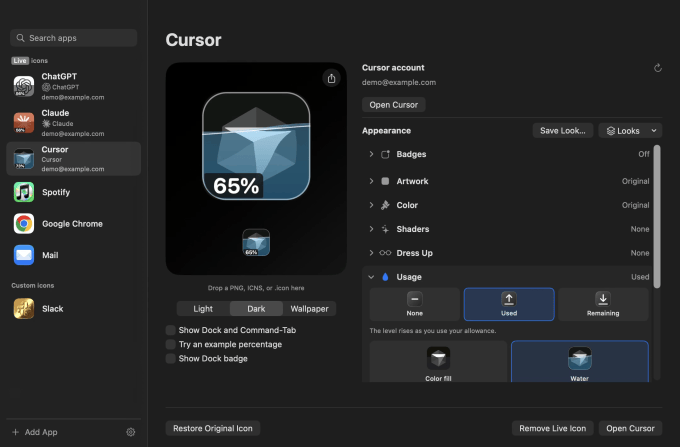
There’s a new way to keep tabs on your AI usage and reset your limits: using your Mac’s app icons. Yes, really!
Designer Michael Flarup has just released a new Mac utility called IconSwapper, which lets you replace the official icon of any app with one of your own creation. Although you can use this tool to change the appearance, design, shading, etc. of your icons, one of the coolest ways to use it is to swap out the icons of AI apps like ChatGPT or Claude with versions that can show your live AI usage.
This is quite simple and you don’t need to be technically minded for it to work. After installing the app on your Mac, all you need to do is choose which app you want to create a “live” icon for, that is, an icon that responds to a particular app.

In addition to tracking AI usage in ChatGPT, Claude, and Cursor, you can also create live icons for a number of built-in Mac apps like Messages, Mail, Safari, Finder, Music, and others like Chrome and Spotify, but these setups tend to be more fun than practical. For example, you can configure Safari’s compass to track things like page loading and downloading, or you can have the Finder guy’s eyes follow your cursor on the screen. (This one is hilarious!)

Of course, there are plenty of other ways to track your AI usage: you don’t need an icon to do it. You can track usage from your account or harness, even from a fun little gadget. But tracking it from the icon adds some whimsy to your Mac desktop setup. (If your dock is cluttered, note that you can also see your icon customizations from your tab bar when you switch apps.)
Beyond dynamic icons, you can also change the appearance of an icon using IconSwapper’s built-in tools.
There are a surprising number of built-in customizations that are as easy to use as clicking a few buttons or flicking a switch. IconSwapper also comes with a huge library of alternative icons for each app already ready to use, or you can upload your own.

Flarup is based in Copenhagen, where he runs a design studio, and has been drawn to icon design and customization for years. He’s been creating his own Mac icons since the early 2000s and even wrote a book on app icons that celebrates the designers’ work.
He was working on a solution that would allow him to customize Mac icons, which proved tricky because macOS has no official support for themes and protects its system icons. To get around this, he developed a different technique that involves drawing directly on the icons without replacing them, allowing him to use shaders, motion, and display real data.
Flarup tells TechCrunch that its renderer executes icon artwork through custom Metal shaders in real time.

“The breakthrough was figuring out how to send the Dock a bitmap for another running application and have it draw that frame itself,” he explained. “I spent a lot of time making the artwork follow the icon through all the little ways macOS moves it, from expanding the Dock to the command-tab switcher. Once that worked, I could make the icon react to whatever was happening,” Flarup said.
This allows users to configure icons to do all kinds of fun and new things they could never do before, like make the light move on a gold icon when you drag your cursor over it, or animate an app’s icon while it’s thinking.
“This opens up a lot of fun ways to make your Mac feel like your own. I’ve always thought that the software we use every day could be a little more fun and a lot more personal,” he added.
The app itself is a one-time purchase of $19 as an introductory promotion, but will later sell for $29, its website says.
When you purchase through links in our articles, we may earn a small commission. This does not affect our editorial independence.
Gn tech