Skip to content
-
Subscribe to our newsletter & never miss our best posts. Subscribe Now!
Today's News. Tomorrow's Perspective. Today's News. Tomorrow's Perspective.

Deliver fast, factual, and easy-to-understand news covering global events, technology, business, science, AI, health, entertainment, and lifestyle.

Today's News. Tomorrow's Perspective. Today's News. Tomorrow's Perspective.

Deliver fast, factual, and easy-to-understand news covering global events, technology, business, science, AI, health, entertainment, and lifestyle.

  • Home
  • Breaking News
  • Business
  • Sports
  • Health
  • Politics
  • Technology & AI
  • World
  • Home
  • Breaking News
  • Business
  • Sports
  • Health
  • Politics
  • Technology & AI
  • World
Close

Search

  • https://www.facebook.com/
  • https://twitter.com/
  • https://t.me/
  • https://www.instagram.com/
  • https://youtube.com/
Subscribe
Android's physical navigation buttons are back on Googlebooks, but not in the way you think
Technology & AI

Android’s physical navigation buttons are back on Googlebooks, but not in the way you think

By adminvoxa
October 8, 2026 1 Min Read
Comments Off on Android’s physical navigation buttons are back on Googlebooks, but not in the way you think

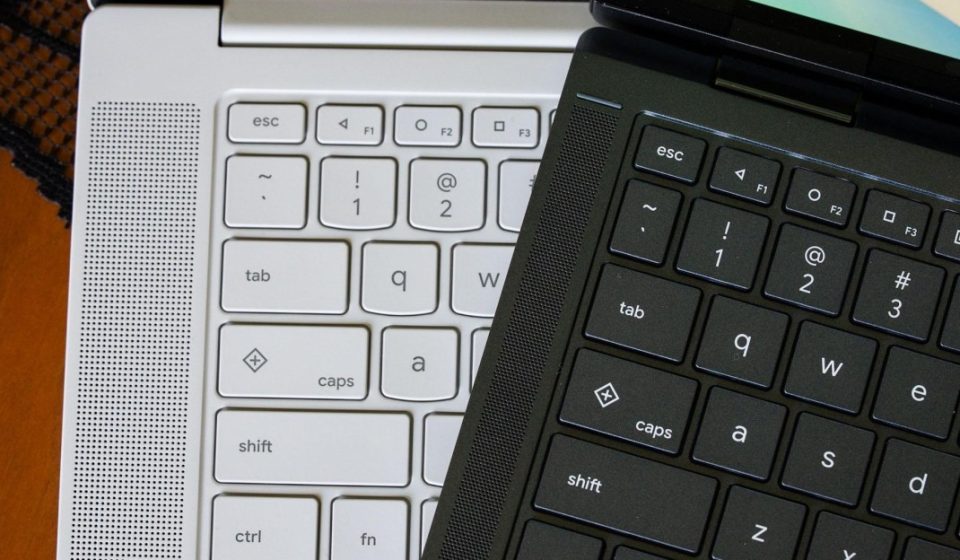
A common misconception I’ve seen with Googlebooks is that the hotkeys and Google logo are new. That’s not the case, as they debuted a few years ago on some Chromebooks. But there is something new for Googlebooks that was pulled directly from Android phones around 2014.

On every Googlebook keyboard, the F1, F2, and F3 keys are the old triangular, circular, and square navigation icons that debuted on Android 5.0 Lollipop. These were the back, home, and app switch buttons long before everything moved to gesture-based navigation, and they’re still built into phones running Android 17 as an alternative. On Googlebook OS, these keys do what you’d expect: the left-pointing triangle goes back, the circle returns “home” by minimizing all open applications, and the square tiles your open applications like Mission Control on macOS / Task View on Windows.

It’s helpful to have these buttons and match them across all Google Books. The back button sometimes feels necessary when using Android apps that aren’t really optimized for a desktop interface or mouse controls. I just wish a second press of the home button would return all your apps to where they were, but that’s another feature called desktop preview that uses a different keyboard shortcut.

If you’re an Android nerd, it’s pretty fun to see these buttons live. But they’re also a reminder that sometimes you need a backup when Android brings all of Android on you.

Gn tech

Post Views: 9
Author

adminvoxa

Follow Me
Other Articles
Winter heating bills could drop for many Americans – while others pay more
Previous

Winter heating bills could drop for many Americans – while others pay more

How 'Chicago Fire' Star Dermot Mulroney Leaves the Show
Next

How ‘Chicago Fire’ Star Dermot Mulroney Leaves the Show

Deliver fast, factual, and easy-to-understand news covering global events, technology, business, science, AI, health, entertainment, and lifestyle.
  • About Us
  • Accessibility Statement
  • Advertise With Us
  • AI Usage & Transparency Policy
  • Contact us
  • Cookie Policy
  • Corrections Policy
  • Meet Our Team
  • Privacy Policy
    • Disclaimer
    • DMCA & Copyright Policy
    • Editorial Policy
    • Ethics Policy
    • Fact-Checking Policy
  • Terms and Conditions
Copyright 2026 — Today's News. Tomorrow's Perspective.. All rights reserved.