
Skip to content
-
Subscribe to our newsletter & never miss our best posts. Subscribe Now!
Today's News. Tomorrow's Perspective. Today's News. Tomorrow's Perspective.

Deliver fast, factual, and easy-to-understand news covering global events, technology, business, science, AI, health, entertainment, and lifestyle.

Today's News. Tomorrow's Perspective. Today's News. Tomorrow's Perspective.

Deliver fast, factual, and easy-to-understand news covering global events, technology, business, science, AI, health, entertainment, and lifestyle.

  • Home
  • Breaking News
  • Business
  • Sports
  • Health
  • Politics
  • Technology & AI
  • World
  • Home
  • Breaking News
  • Business
  • Sports
  • Health
  • Politics
  • Technology & AI
  • World
Close

Search

Subscribe
“Backglow” lets you customize the glowing Apple logo on the new MacBook Pro
Technology & AI

“Backglow” lets you customize the glowing Apple logo on the new MacBook Pro

ment
By ment
November 8, 2026 2 Min Read
Comments Off on “Backglow” lets you customize the glowing Apple logo on the new MacBook Pro

A new “Backglow” application created by designer Juan Buis allows you to personalize the illuminated Apple logo on the lid of new MacBook Pro models.
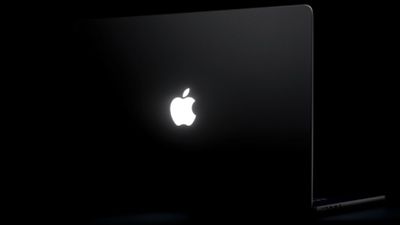
MacBook Pro shiny Apple logo
The free version of the app allows you to manually adjust the brightness level of the Apple logo, independent of the brightness level of the MacBook Pro screen. You can also disable it completely with a single click, rather than having to use Terminal.

Another free option is a “Breathe” mode that gently blinks the logo light similar to the sleep light on older MacBooks.

A one-time payment unlocks the Pro version of the app: $9 for a limited time or $15 later. This gives you two additional modes: “Music” mode makes the logo light move to the beat of the music you play on your Mac, while “Agents” mode makes the light vibrate while Claude Code works and flash when your attention is required.

here’s what it can do: – manually adjust the brightness of the logo (Apple doesn’t allow you to do this)
– breathe slowly, like the old Mac night light
– vibrate to the rhythm of your music
– blink when Claude needs you
– turn off logo light in one click, try it here: https://t.co/WZTWMq5yAf https://t.co/FI0o9ayKBZ — juan (@juanbuis) November 6, 2026

Apple began phasing out the glowing logo on MacBooks in 2015, but brought back the feature with new 14- and 16-inch MacBook Pro models with PROLED XDR displays released Friday. On older MacBooks, the logo was illuminated by the screen backlight, but OLED displays don’t have a backlight, so a new method was needed.

Bold FireballJohn Gruber of ‘s learned that Apple designed a “custom light source just to allow the logo to shine again, without adding extra thickness to the lid.” For what? “Because it’s great,” he heard an Apple representative say.

By default, Apple says the logo is illuminated whenever the Mac is woken up. It automatically brightens or darkens based on the screen brightness level and the lighting conditions in your environment detected by the computer’s ambient light sensor.

Buis said the logo is illuminated by a white LED that does not change color.

Gn tech

Views: 13
ment
Author

ment

**Ment** is a journalist at dailyvoxa.com, covering current events and sharing clear, reliable stories with readers. He is committed to thoughtful reporting and making important news accessible to a broad audience.

Follow Me
Other Articles
Hoping for a rapid drop in gas prices after the midterm elections? This probably won't happen
Previous

Hoping for a rapid drop in gas prices after the midterm elections? This probably won’t happen

Alanis Morisette comes out as pansexual at 52
Next

Alanis Morisette comes out as pansexual at 52

Deliver fast, factual, and easy-to-understand news covering global events, technology, business, science, AI, health, entertainment, and lifestyle.
  • About Us
  • Accessibility Statement
  • Advertise With Us
  • AI Usage & Transparency Policy
  • Contact us
  • Cookie Policy
  • Corrections Policy
  • Meet Our Team
  • Privacy Policy
    • Disclaimer
    • DMCA & Copyright Policy
    • Editorial Policy
    • Ethics Policy
    • Fact-Checking Policy
  • Terms and Conditions
Copyright 2026 — Today's News. Tomorrow's Perspective.. All rights reserved.